How to Check Application Status
Track your application progress.
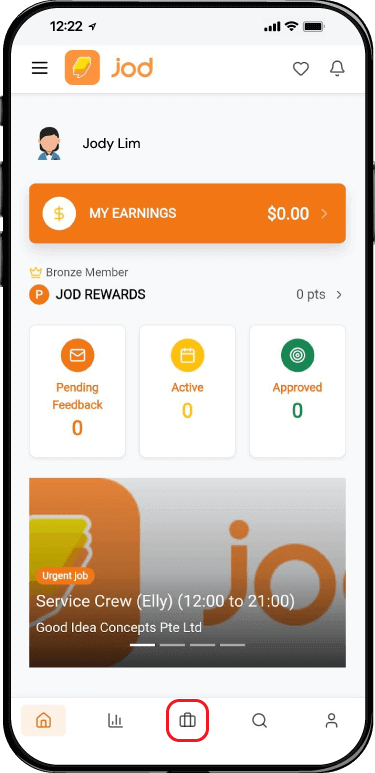
Back to GuidesStep 1. Click “Suitcase” Icon on the Bottom of the Page (Middle Icon) Or Click The “Pending Feedback” Button in the Middle of the Page (Below Jod Rewards”)
Step 2. Go to “Pending” Status button to see which jobs that you've applied
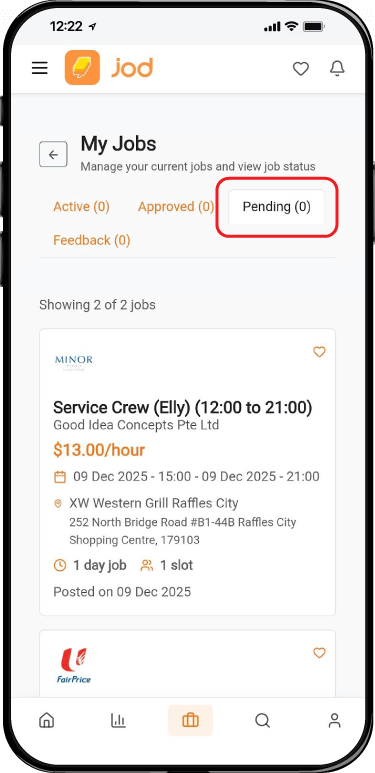
Status Meanings
- Active: Jobs you are currently working on or scheduled.
- Approved: Jobs where you have been selected by the hiring manager.
- Pending: Applications you have submitted and are awaiting review.
- Feedback: Jobs that require you to submit feedback after completion.
How to Check Application Status
Track your application progress.
Back to GuidesStep 1. Click “Suitcase” Icon on the Bottom of the Page (Middle Icon) Or Click The “Pending Feedback” Button in the Middle of the Page (Below Jod Rewards”)
Step 2. Go to “Pending” Status button to see which jobs that you've applied
Status Meanings
- Active: Jobs you are currently working on or scheduled.
- Approved: Jobs where you have been selected by the hiring manager.
- Pending: Applications you have submitted and are awaiting review.
- Feedback: Jobs that require you to submit feedback after completion.