How to Apply for Jobs
Apply for jobs easily.
Back to GuidesStep 1. Browse the Jobs that you want
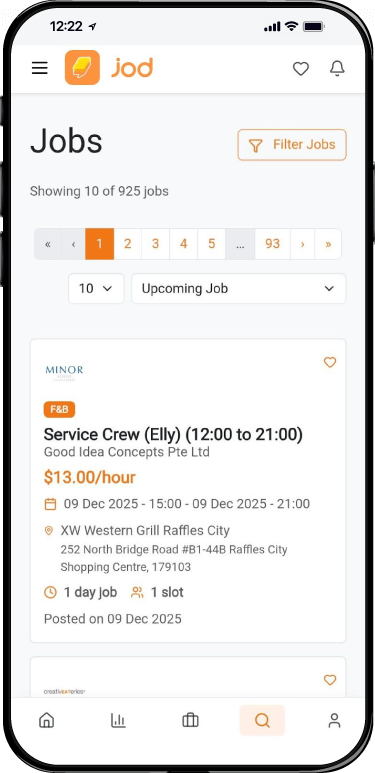
Step 2. Click The Specific Job
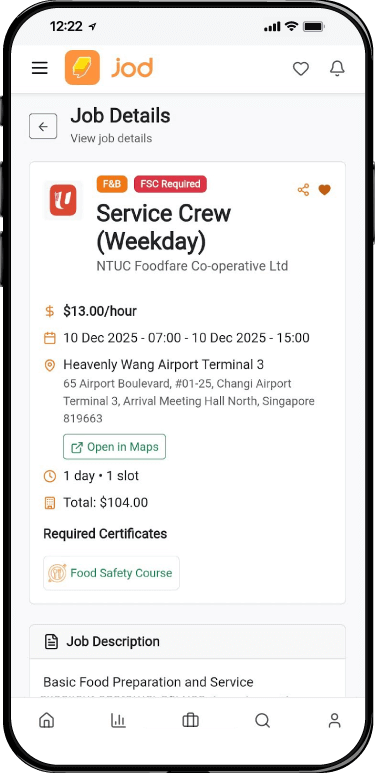
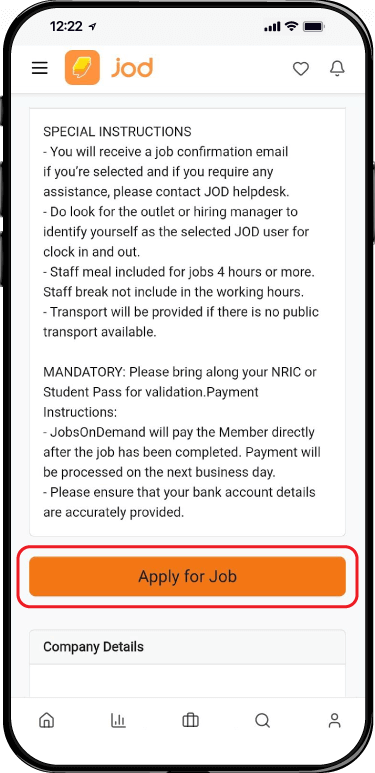
Step 3. Scroll to The Bottom and Click “Apply for Job” button to apply for the job. If you are not logged in, you will need to log in first after clicking “Apply for Job”.
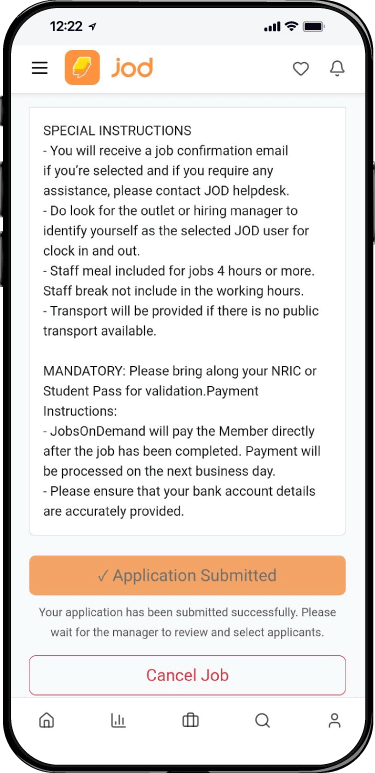
Step 4. Wait until the button turns to “Application Submitted”, which means you've successfully applied for the job
How to Apply for Jobs
Apply for jobs easily.
Back to GuidesStep 1. Browse the Jobs that you want
Step 2. Click The Specific Job
Step 3. Scroll to The Bottom and Click “Apply for Job” button to apply for the job. If you are not logged in, you will need to log in first after clicking “Apply for Job”.
Step 4. Wait until the button turns to “Application Submitted”, which means you've successfully applied for the job